
Many TradingView scripts look almost perfect on an old chart. Signals sit right at the turns, and zones catch every bounce. The question every trader should ask first is simple: do these TradingView indicators repaint? In other words, does the history you see match what the indicator showed in real time?
Our Repaint Checks answer that question with tests, not opinions. We run popular community scripts through TradingView’s Bar Replay, compare the screenshots pixel by pixel, and publish exactly what changed and what did not. If you are new to the topic, start with our guide What Is Repainting?
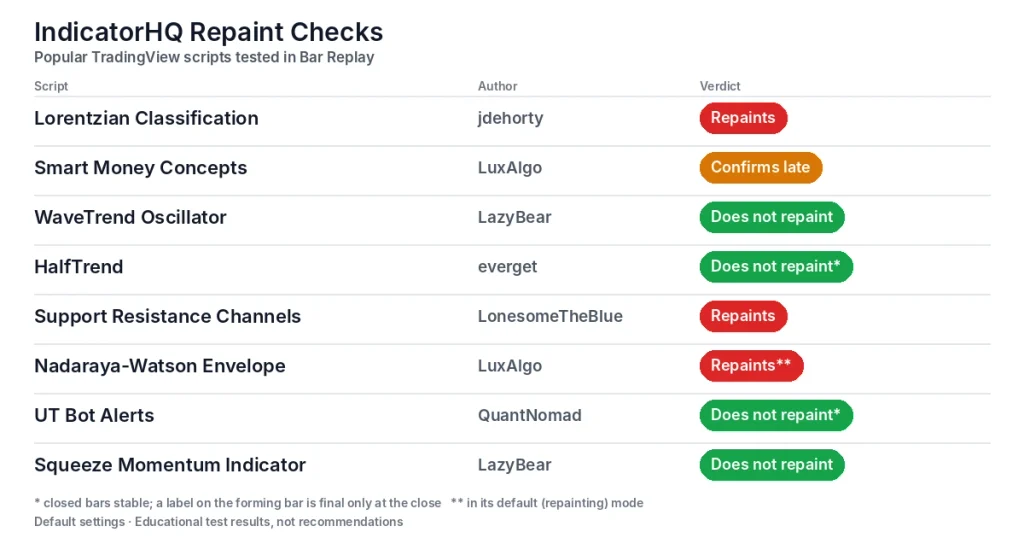
Repainting Indicators List: Our Results So Far
| Script | Author | Verdict | What changes | Chart tested | Full test |
|---|---|---|---|---|---|
| Machine Learning: Lorentzian Classification | jdehorty | Repaints | Past predictions and signal shading depend on where the chart starts | Apple daily | Read the test |
| Smart Money Concepts | LuxAlgo | Confirms late | Structure lines are drawn back to earlier swings; broken order blocks are removed | USD/JPY 1-hour | Read the test |
| WaveTrend Oscillator | LazyBear | Does not repaint | Only the forming bar moves | DAX 4-hour | Read the test |
| HalfTrend | everget | Does not repaint | Closed bars are stable, but labels on the forming bar can appear and vanish | Tesla daily | Read the test |
| Support Resistance Channels | LonesomeTheBlue | Repaints | Today’s zones are redrawn across the whole chart | Nifty Bank daily | Read the test |
| Nadaraya-Watson Envelope | LuxAlgo | Repaints (default mode) | In the default mode, the envelope on closed bars moves as new bars arrive; the non-repainting mode stayed fixed | Oracle 4-hour | Read the test → |
| UT Bot Alerts | QuantNomad | Does not repaint | Closed-bar labels never moved; TradingView still shows a repaint caution | Dow Jones daily | Read the test → |
| Squeeze Momentum Indicator | LazyBear | Does not repaint | Histogram, colours and squeeze crosses never changed on closed bars | AUD/USD 1-hour | Read the test → |
Nadaraya-Watson Envelope was tested inside our full guide (Bar Replay, 20 bars forward, in both modes), not with all five tests.
These are test results on default settings, not recommendations to use or avoid any script.
What Our Verdicts Mean
- Does not repaint: once a bar has closed, nothing on it changes. The bar that is still forming can move, which is normal for every indicator.
- Confirms late: signals or drawings stay in place once they appear, but they are drawn back to an earlier bar. On an old chart, they look better timed than they were in real time.
- Repaints: values, signals or drawings on bars that have already closed change later. The history you see is not what a trader would have seen at the time.
How We Test Each Indicator
Every Repaint Check uses the same five tests in TradingView’s Bar Replay, on the script’s default settings and on chart data at least 30 days old:
- Same session: we move forward 20 bars and check whether past bars change.
- Live bar: we watch a bar form step by step to see what happens before it closes.
- Reload: we reload the chart at the same date and compare.
- Different start dates: we start the replay on three different dates and compare the same bars.
- Alert check: we look at whether TradingView’s alert window shows a repaint caution.
We compare the screenshots pixel by pixel, and we never use or read a script’s source code. Full details are on our How We Test page.
Non Repainting Indicators on TradingView: What We Learned
Testing five very different scripts taught us four things that apply to almost any indicator:
- TradingView’s repaint caution is only a hint. It appeared for Lorentzian Classification and Smart Money Concepts, but not for Support Resistance Channels, which also repainted in our tests. Always test the script itself.
- “Does not repaint” still needs a closed bar. HalfTrend never changed a closed bar, yet one Sell label appeared, vanished and came back within a single daily bar. Act only on closed-bar signals.
- Some tools draw today’s levels over the past. Support Resistance Channels showed the same zones for any given date, but drew them across the whole chart, so old bounces looked better than they were.
- Some histories depend on where the chart starts. With Lorentzian Classification, the same old bars looked different depending on the replay start date.
Suggest the Next Script
Want us to test a script you use? Send the exact name and author through our Contact page. We prioritise popular open-source scripts that traders ask about most.
Frequently Asked Questions
Do TradingView indicators repaint?
Some do and some don’t. Classic indicators such as RSI and MACD do not change once a bar has closed. Some community scripts do repaint: in our tests, three of eight scripts repainted on their default settings, one confirmed late, and four did not repaint. The only way to know is to test the script.
Which TradingView indicators don’t repaint?
In our tests, WaveTrend Oscillator, HalfTrend, UT Bot Alerts and Squeeze Momentum Indicator did not change any closed bar. Remember that every indicator can change on the bar that is still forming, so always wait for the bar to close.
How can I check if an indicator repaints?
Use TradingView’s Bar Replay: take a screenshot, move forward 20 bars, and compare the closed bars. Then start the replay on a different date and compare again. Our guide What Is Repainting? has a full checklist.
Risk disclaimer: This page is for educational purposes only and is not investment advice. It reports how indicators behaved in our tests on historical data; it is not a review of their profitability and not a recommendation to use or avoid any script. Trading in stocks, forex, commodities, derivatives and crypto involves a substantial risk of loss and is not suitable for everyone. Consider speaking to a SEBI-registered investment adviser (or a licensed adviser in your country) before making trading decisions. See our full Disclaimer.